With the suspension of support for more Ubuntu friendly format from Oracle we sometime face issues with installing Oracle Jdk 7 on ubuntu.I have a 64 bit oracle JDK installed on my system from the following PPAPPA: http://ppa.launchpad.net/webupd8team/java/ubuntuyou need to perform the following steps for installing the oracle JDK7 on your ubuntu 12.04 64 bit system1. $> sudo add-apt-repository ppa:webupd8team/java2. $> sudo apt-get update3. $> sudo apt-get install oracle-java7-installerAfter this you can check and select which java version you would like to use on the system$>sudo update-alternatives --config javaOnce this is done you probably would like to ensure that browser is using this java plugin, for that you need to carry out these optionscreate a "plugins" directory in the "~/.mozilla" path$> mkdir ~/.mozilla/pluginsNow you need to have a soft link to the actual file, which will be responsible for running the java on your browser(mozilla/chrome/chromium all use this plugins directory)$>ln -s /usr/lib/jvm/java-7-oracle/jre/lib/amd64/libnpjp2.so ~/.mozilla/pluginsOnce this is done you check the oracle link Test Page to see if the java is running fine on your systemNow you would probably like to run eclipse on your system, for that these is a catch. I was facing issues when i was trying to open eclipse form my system and was getting this errorjava.lang.UnsatisfiedLinkError: Could not load SWT library. Reasons:no swt-gtk-3740 in java.library.pathno swt-gtk in java.library.pathWhat this means is that the .swt folder at your home directory is missing few files which you need to manually copy. First you need to have following packages installed(generally they are installed if you have Gnome 3)$> sudo apt-get install libswt-gtk-3-jni libswt-gtk-3-javaOnce you have installed these packages you can proceed to copy files which are needed$> sudo cp /usr/lib/jni/libswt-*3740.so ~/.swt/lib/linux/x86_64In case its a i386 install then the command will be$> sudo cp /usr/lib/jni/libswt-*3740.so ~/.swt/lib/linux/x86You could also create the soft link to required fileslibswt-atk-gtk-3740.so -> /usr/lib/jni/libswt-atk-gtk-3740.solibswt-cairo-gtk-3740.so -> /usr/lib/jni/libswt-cairo-gtk-3740.solibswt-awt-gtk-3740.so -> /usr/lib/jni/libswt-awt-gtk-3740.solibswt-gnome-gtk-3740.so -> /usr/lib/jni/libswt-gnome-gtk-3740.solibswt-glx-gtk-3740.so -> /usr/lib/jni/libswt-glx-gtk-3740.solibswt-gtk-3740.so -> /usr/lib/jni/libswt-gtk-3740.solibswt-webkit-gtk-3740.so -> /usr/lib/jni/libswt-webkit-gtk-3740.solibswt-pi-gtk-3740.so -> /usr/lib/jni/libswt-pi-gtk-3740.soOnce this is done you need to edit the eclipse.ini file to explicitly tell eclipse which VM to use. If you have installed eclipse using the Ubuntu Software Center you need to go to the following path to edit the file$> sudo gedit /usr/lib/eclipse/eclipse.iniYou can specify the VM by adding these lines in the file-vm/usr/lib/jvm/java-7-oracle/bin
Once all these steps are done you should be ready with starting your development in Java on Ubuntu 12.04 64bit.
Enjoy !
References :
askubuntu.com : http://askubuntu.com/questions/125150/unsatisfied-link-error-and-missing-so-files-when-starting-eclipse
technonstop.com : http://technonstop.com/install-java-plugin-ubuntu-linux
Stackoverflow.com : http://stackoverflow.com/questions/10165693/ubuntu-eclipse-cannot-load-swt-libraries-not-opening
Saturday, May 5, 2012
Making Oracle JAVA work on Ubuntu 12.04

Monday, April 9, 2012
Sum of Binary Tree Nodes
For the past few days i have been digging into the Trees Data Structure. Trees or graphs are one the most practically used Data Structure due to their better performance over Linked list and Arrays.
Let's go straight to the problem: We need to calculate the sum for all the parent nodes in the tree and only leaf nodes has the values.
Thanks to this post Post on stackoverflow, this issue is a problem of recursion. Remember for any issue where you need to travel each node in a tree can be solved by recursion. If you want to traverse a tree (In order, Preorder or Post Order) you will use recursion to do this.
Example Tree :
-------------------------------------------------------------
5,0,0
3,0,0 7,0,0
2,0,0 4,0,0 6,0,0 9,0,0
-------------------------------------------------------------
This is the Node class which i have printed
public class TreeNodeLL {
int key;
int data;
int leftSum;
int rightSum;
TreeNodeLL leftChild;
TreeNodeLL rightChild;
public TreeNodeLL(int key, int data) {
this.key = key;
this.data = data;
this.leftChild = null;
this.rightChild = null;
}
}
So the leftSum = Sum of 'key' variable in the left Sub-tree.
similarly rightSum = Sum of 'key' variable in Right Sub-tree.
We have the method to calculate this
public int sum(TreeNodeLL node){
if (node == null) {
return 0;
}
else{
node.leftSum = sum(node.leftChild);
node.rightSum = sum(node.rightChild);
return node.key + node.leftSum + node.rightSum;
}
}
Output would be:
-------------------------------------------------------------
5,9,22
3,2,4 7,6,9
2,0,0 4,0,0 6,0,0 9,0,0
-----------------------------------------------------------
References:
Data Structures in Java by Robert Lafore
Stackoverflow.com
Let's go straight to the problem: We need to calculate the sum for all the parent nodes in the tree and only leaf nodes has the values.
Thanks to this post Post on stackoverflow, this issue is a problem of recursion. Remember for any issue where you need to travel each node in a tree can be solved by recursion. If you want to traverse a tree (In order, Preorder or Post Order) you will use recursion to do this.
Example Tree :
-------------------------------------------------------------
5,0,0
3,0,0 7,0,0
2,0,0 4,0,0 6,0,0 9,0,0
-------------------------------------------------------------
This is the Node class which i have printed
public class TreeNodeLL {
int key;
int data;
int leftSum;
int rightSum;
TreeNodeLL leftChild;
TreeNodeLL rightChild;
public TreeNodeLL(int key, int data) {
this.key = key;
this.data = data;
this.leftChild = null;
this.rightChild = null;
}
}
So the leftSum = Sum of 'key' variable in the left Sub-tree.
similarly rightSum = Sum of 'key' variable in Right Sub-tree.
We have the method to calculate this
public int sum(TreeNodeLL node){
if (node == null) {
return 0;
}
else{
node.leftSum = sum(node.leftChild);
node.rightSum = sum(node.rightChild);
return node.key + node.leftSum + node.rightSum;
}
}
Output would be:
-------------------------------------------------------------
5,9,22
3,2,4 7,6,9
2,0,0 4,0,0 6,0,0 9,0,0
-----------------------------------------------------------
References:
Data Structures in Java by Robert Lafore
Stackoverflow.com
Wednesday, March 28, 2012
Recursion - Kanpsack Problem
Continuing my quest, playing with old computer science theories today i am writing about recursion and using it to solve similar issue as that of Knapsack problem. So, if you know about Recursion (like some flavor of it which i discussed in my last post) you would know its a very powerful tool which can be used to solve complex computer science problems.
In this approach we call same method from within a method with a base case which marks as its end, so we effectively call our self till we reach a base case and then we trace back till the starting. In java when a method call is placed in code it is loaded on to a stack in JVM which the run time environment will call, so if i call my self again and again i will end up having several stack entries of the same method and when the base case returns something it will unfold with last in last out rule.
As it may seem this is a powerful yet not that efficient tool as the repeated method calls can be expensive.
So, let's take a sample problem which is similar to Knapsack Problem remember Knapsack problem is a NP-complete problem hence no optimal solution exists for it. Please note this exercise is to understand and practice recursion not to get the optimal solution to Knapsack Problem.
Problem
We have a array of descending numbers and we need to pick a set whose total is equal to the target.
E.g. array = 11, 8, 7, 6 ,5
Target Total = 20
We will create a program that can calculate the first set of numbers from this to get the result.
References :
Data Structures and Algorithms by Robert Lafore
In this approach we call same method from within a method with a base case which marks as its end, so we effectively call our self till we reach a base case and then we trace back till the starting. In java when a method call is placed in code it is loaded on to a stack in JVM which the run time environment will call, so if i call my self again and again i will end up having several stack entries of the same method and when the base case returns something it will unfold with last in last out rule.
As it may seem this is a powerful yet not that efficient tool as the repeated method calls can be expensive.
So, let's take a sample problem which is similar to Knapsack Problem remember Knapsack problem is a NP-complete problem hence no optimal solution exists for it. Please note this exercise is to understand and practice recursion not to get the optimal solution to Knapsack Problem.
Problem
We have a array of descending numbers and we need to pick a set whose total is equal to the target.
E.g. array = 11, 8, 7, 6 ,5
Target Total = 20
We will create a program that can calculate the first set of numbers from this to get the result.
public class KnapsackProblem {

 private Stackx output;
 private int[] input;
 private int size;
 private int target;

 public KnapsackProblem(int target){
  this.input = new int[10];
  this.size = 0;
  this.output = new Stackx(10);
  this.target = target;
 }

 public void insert(int item) {
  input[size++] = item;
 }

 public void recKnapsack() {
  boolean flag = false;
  for (int i = 0; i < size; i++) {
   if (input[i] == target) {
    System.out.println("got it !");
   } else if (input[i] > target) {
    continue;
   } else if (input[i] < target) {
    boolean result = knapsackNew(target, i);
    if (result) {
     output.display();
     flag = true;
     break;
    } else{
     while(!output.isEmpty()){
      output.pop();
     }
    }
   }
  }
  if (flag) {
   System.out.println("  Success !!");
  } else {
   System.out.println("Cant find any conbination to get the target: " + target);
  }

 }

 public boolean knapsackNew(int target, int i) {
  if (i == size) {
   return false;
  }
  if (input[i] < target) {
   output.push(input[i]);
   return knapsackNew(target - input[i], ++i);
  } else if (input[i] > target) {
   return knapsackNew(target, ++i);
  } else if (input[i] == target) {
   output.push(input[i]);
   return true;
  }

  return false;
 }

 public static void main(String[] args) {
  KnapsackProblem obj = new KnapsackProblem(20);

  obj.insert(11);
  obj.insert(8);
  obj.insert(7);
  obj.insert(6);
  obj.insert(5);

  obj.recKnapsack();
 }
}
References :
Data Structures and Algorithms by Robert Lafore
Monday, March 26, 2012
Shell Sort - Let the shelling begin
So, many of us already know about insertion sort which is a nice sorting algorithm for sorting but lacks in performance, with complexity of O(n2), but gives a good performance when it comes to almost sorted list.
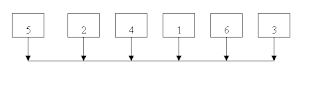 Using this property of fast processing in case of almost sorted list, Shell sort can achieve much better results then insertion sort. Shell sort does this by doing a "incremental sort" of the array. By that i mean it first divides the array into parts and sorts the elements relative to each other.
E.g. Array = 5 2 4 1 6 3 7
Lets take a interval of 4 and consider every 4rd element in this array
so we will compare 5, 1 and 7 and will sort these element relative to each other.
new Array = 1 2 4 5 6 3 7
In the next iteration we will consider a smaller number, finally we will reach to a point where we will have a interval of 1 and will be a simple insertion sort but by that time must of the element would be in there positions or very near to there final positions making this a fast iteration.
So we start with a big "Shell" and imagine these are the only elements in the array and sort then move on to making them smaller and smaller till we have a shell size of 1. As you may have noticed key is the division rule or the series(called a "Gap Sequence"or "Interval Sequence") we will use to decide on the shell sizes. Remember we need to have a series which ends with 1 so that we can run the insertion sort in the end. One of these series is provided by Kunth,
h = 3*h + 1
now in word of Kunfu Panda "enough talk, let's code"
Data Structures and Algorithms in Java by Robert Lafore
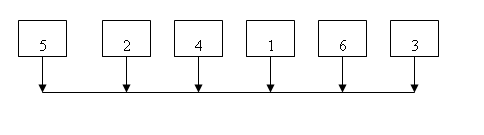
E.g. Array = 5 2 4 1 6 3 7
Lets take a interval of 4 and consider every 4rd element in this array
so we will compare 5, 1 and 7 and will sort these element relative to each other.
new Array = 1 2 4 5 6 3 7
In the next iteration we will consider a smaller number, finally we will reach to a point where we will have a interval of 1 and will be a simple insertion sort but by that time must of the element would be in there positions or very near to there final positions making this a fast iteration.
So we start with a big "Shell" and imagine these are the only elements in the array and sort then move on to making them smaller and smaller till we have a shell size of 1. As you may have noticed key is the division rule or the series(called a "Gap Sequence"or "Interval Sequence") we will use to decide on the shell sizes. Remember we need to have a series which ends with 1 so that we can run the insertion sort in the end. One of these series is provided by Kunth,
h = 3*h + 1
now in word of Kunfu Panda "enough talk, let's code"
 /**
 * This method will sort the array
 * using Kunth's formula to calculate
 * the bucket.
 */
public void shellSort() {
 int inner;
 int outer;
 int h = 1;
 /**
  * Calculate the bucket size to the max
  * then we move down till we reach around 1
  */
 while(h <= (nElemt/3)){
  h = h*3 + 1;
 }
 while(h > 0){
  for(outer = h; outer < nElemt; outer++){
   int temp = array[outer];
   inner = outer;
   while(inner > h-1 &&
                                    array[inner - h] >= temp){
    array[inner] = array[inner - h];
    inner -= h;
   }
   array[inner] = temp;
  }
  h = (h-1) / 3; //get the value of bucket back
 }
}
References :Data Structures and Algorithms in Java by Robert Lafore
Tuesday, March 13, 2012
Merge Sort explained
For past few days i have been going back to basics. these are the topics which got me started with coding in the first place. Although these are simple topics in Computer science but form the very basic of coding in any language.
Well lets start off with some back ground about the Merge Sort. This basically comes from the family of algorithms which is based on divide and conquer methodology(If you know your history almost all civilizations at some point of time had someone playing this game in the kingdom).
The intent is to divide a big problem(in this case a array ) into smaller problems so that they can be solved easily(by easily i mean in few lines of code). Imagine if you have a array of 10,000 objects and you want to sort it according to their values (in this case we will take a simple example of a integer generally these are complex objects but the principle remains the same). If we divide this array till it becomes a single element then we simply compare the element and get the result, that forms the basis of this algorithm. We will divide a array till we have two arrays having only one element and then we compare them and merge the arrays.
So, we have two steps
public void merge(int[] workspace, int lowPtr, int highPtr,
int upperBound) {
int i = 0; // workspace index
int lowerBound = lowPtr;
int mid = highPtr - 1;
int n = upperBound - lowerBound + 1; // number of items
while (lowPtr <= mid && highPtr <= upperBound) {
if (array[lowPtr] < array[highPtr]) {
workspace[i++] = array[lowPtr++];
} else {
workspace[i++] = array[highPtr++];
}
}
while(lowPtr <= mid){
workspace[i++] = array[lowPtr++];
}
while(highPtr <= upperBound){
workspace[i++] = array[highPtr++];
}
for (int j = 0; j < n; j++) {
array[lowerBound + j] = workspace[j]; // copy the merged array back
}
}
Since we keep on dividing the array into 2 parts, the final time complexity of this algorithm is O(n log n)
Please keep in mind the base of Log is 2 here.
For better time complexity we compromise on space here as we are using 2 arrays of the same size, so if you are programming on device which is limited on size you might want to consider more complex sorting algorithms but more on that later.
References :
Data Structures & Algorithms in Java by Robert Lafore
Well lets start off with some back ground about the Merge Sort. This basically comes from the family of algorithms which is based on divide and conquer methodology(If you know your history almost all civilizations at some point of time had someone playing this game in the kingdom).
The intent is to divide a big problem(in this case a array ) into smaller problems so that they can be solved easily(by easily i mean in few lines of code). Imagine if you have a array of 10,000 objects and you want to sort it according to their values (in this case we will take a simple example of a integer generally these are complex objects but the principle remains the same). If we divide this array till it becomes a single element then we simply compare the element and get the result, that forms the basis of this algorithm. We will divide a array till we have two arrays having only one element and then we compare them and merge the arrays.
So, we have two steps
- Divide till we reach to a point where we have 1 element which can be compared.
- merge the elements.
Merging
Lets look at Merging two sorted arrays first. We will be doing this when we divide the single array into two and then we will merge it.
Input array A = 11,33,55,77,99
Input array B = 22,44,66,88
For merging these 2 arrays we will choose each element and compare with each other and push in a new array.
Iteration 1: compare 11 with 22
11 is smaller hence we push it in a new array C and increment the counter for A.
then we compare next element in A with same element in B i.e. 33 with 22 now 22 is smaller hence we push 22 in C and increment the counter for B.
array C : 11,22
After all the iteration we will have one single array with sorted elements.
Recursion
Now let's look at recursion part of it. Our focus here is to divide the problem into smaller parts till we reach the base case.
e.g. Input Array = 55,33,44,11,22
we will take a lower pointer (0 position ) and upper pointer(4 position) and calculate the mid. Now we will call the same method with upper pointer as mid and same value of lower pointer.
We will keep on calculating till we have lowerPtr == UpperPtr then we have only one element.
Similarly we will call same method again with mid as lower pointer and same value for upper pointer.
The code will look like this.
public void recMergeSort(int[] workspace, int lowerBound, int upperBound) {if (lowerBound == upperBound) {return;} else {int mid = (lowerBound + upperBound)/2;recMergeSort(workspace, lowerBound, mid);recMergeSort(workspace, mid + 1, upperBound);merge(workspace, lowerBound, mid + 1, upperBound);}}
We use workspace array to hold the merged output
the last line submits the array to get it merged, here we will divide the same array in two parts from lower to mid and from mid+1 to upper.
Here is the Java code for it.
int upperBound) {
int i = 0; // workspace index
int lowerBound = lowPtr;
int mid = highPtr - 1;
int n = upperBound - lowerBound + 1; // number of items
while (lowPtr <= mid && highPtr <= upperBound) {
if (array[lowPtr] < array[highPtr]) {
workspace[i++] = array[lowPtr++];
} else {
workspace[i++] = array[highPtr++];
}
}
while(lowPtr <= mid){
workspace[i++] = array[lowPtr++];
}
while(highPtr <= upperBound){
workspace[i++] = array[highPtr++];
}
for (int j = 0; j < n; j++) {
array[lowerBound + j] = workspace[j]; // copy the merged array back
}
}
Since we keep on dividing the array into 2 parts, the final time complexity of this algorithm is O(n log n)
Please keep in mind the base of Log is 2 here.
For better time complexity we compromise on space here as we are using 2 arrays of the same size, so if you are programming on device which is limited on size you might want to consider more complex sorting algorithms but more on that later.
References :
Data Structures & Algorithms in Java by Robert Lafore
Tuesday, April 19, 2011
James at google!!
I guess that was a good choice by James . I have been following his blogs for past year or so. I think the kind of work ethics he works with, Google was an obvious choice. Well i wish him best of luck at Google. Can't wait to see new innovations with Android !!
Sunday, January 30, 2011
Having Fun with Ubuntu !!
Sorry for the silence for last couple of months, i think holidays kinda got to me and my belly :).
Well i have been using open source software since i started coding from my college days but never really knew the potential they have in sharing and understanding softwares. I have been using Ubuntu 10.04 LTS for past one year now and i would have to say windows who ! ? Specially i have been having fun developing JAVA applications on the platform. Recently i have come across few nice shortcuts in the Gnome UI which i found useful and wanted to share with you all.
Win button (one with Win Logo) + e. -> lists all the 4 default workspace you have.
I found this very useful. Very handy when you would like to see all the workspaces at a glance.
Win button + a -> this one lists all the active programs you have open in all the 4 workspaces.
This one again very useful when you don't remember (Like i am ) which window i opened in which workspace.
I also have recently been keeping my eye on the latest Gnome 3! release. Can't wait to get my hands on that one.
I have been trying my hands on Android Application development on Linux platform and would be updating about it very soon.
Well i have been using open source software since i started coding from my college days but never really knew the potential they have in sharing and understanding softwares. I have been using Ubuntu 10.04 LTS for past one year now and i would have to say windows who ! ? Specially i have been having fun developing JAVA applications on the platform. Recently i have come across few nice shortcuts in the Gnome UI which i found useful and wanted to share with you all.
Win button (one with Win Logo) + e. -> lists all the 4 default workspace you have.
I found this very useful. Very handy when you would like to see all the workspaces at a glance.
Win button + a -> this one lists all the active programs you have open in all the 4 workspaces.
This one again very useful when you don't remember (Like i am ) which window i opened in which workspace.
I also have recently been keeping my eye on the latest Gnome 3! release. Can't wait to get my hands on that one.
I have been trying my hands on Android Application development on Linux platform and would be updating about it very soon.
Subscribe to:
Posts (Atom)